Building a Voice-Interactive Desktop Mascot Agent with Electron, Go, and whisper.cpp
Imagine speaking to a character in the corner of your desktop. It turns toward you, answers, and sometimes helps with your work like a personal assistant.
Not long ago, building something like this would have been an elaborate project pursued mostly for the fun of it.
AI has made many tasks more efficient, but I have also found that reaching for the keyboard just to make a small request can feel like unnecessary friction. So I wondered: what if I could simply talk to a mascot on my desktop and ask it to handle the task?
That idea—somewhere between practical utility and playful experimentation—became the starting point for this voice-interactive desktop mascot agent.
What I Built
Section titled “What I Built”The result is a voice-interactive mascot that runs on the macOS desktop.
Its main features include:
- A persistent character displayed in a transparent window
- Motion and physics simulation
- Push-to-talk through a global hotkey
- Japanese speech recognition with whisper.cpp
- Response generation and task execution through an AI agent
- Speech synthesis with GPT-SoVITS
- Basic lip-sync driven by playback volume
- Status indicators for recording, transcription, thinking, confirmation, speaking, and more
Architecture
Section titled “Architecture”The application is split into an Electron app, which handles rendering and audio input/output, and a Go orchestrator that connects the individual components.
flowchart LR
    User["User"] -->|"Push to talk"| Electron["Mascot (Electron)"]
    Electron -->|"WAV / WebSocket"| Go["Go orchestrator"]
    Go -->|"Speech recognition"| Whisper["whisper.cpp"]
    Whisper -->|"Transcript"| Go
    Go -->|"Prompt"| AI["Claude Code"]
    AI -->|"Response text"| Go
    Go -->|"Speech synthesis"| TTS["GPT-SoVITS"]
    TTS -->|"WAV"| Go
    Go -->|"Synthesized audio"| Electron
    Electron -->|"Playback and lip-sync"| User
Speech recognition and synthesis both run locally. I originally planned to host the Go orchestrator and TTS service on separate machines, but my Mac handled the workload well enough that I now run Electron, Go, whisper.cpp, and GPT-SoVITS together on the same computer.
Claude Code and any connected MCP servers may use external services, so the overall system is not entirely local.
Rendering the Desktop Mascot with Electron
Section titled “Rendering the Desktop Mascot with Electron”The Electron app displays the character model in a transparent, always-on-top window, allowing it to behave like a desktop mascot.
It also supports physics, gaze tracking, and camera adjustments. The UI shows connection status and logs for each service as well.
Talking with the Right Option Key
Section titled “Talking with the Right Option Key”Voice input uses push-to-talk. Recording begins when I press the right Option key and ends when I release it.
Electron’s globalShortcut API cannot detect the key-up event required for push-to-talk, so I used uiohook-napi to capture global keydown and keyup events.
After using it for a while, even pressing a key every time began to feel slightly inconvenient. I would eventually like to add wake-word detection, similar to “Hey Siri,” to begin a conversation hands-free.
Managing Conversation State in Go
Section titled “Managing Conversation State in Go”The Go orchestrator connects Electron, whisper.cpp, the AI agent, and GPT-SoVITS.
Its role is not limited to forwarding HTTP requests. A voice interaction moves through a sequence of stages—recording, transcription, response generation, and speech synthesis—so I manage the conversation as a state machine.
stateDiagram-v2
    [*] --> Idle
    Idle --> Recording: PTT pressed
    Recording --> Transcribing: PTT released
    Transcribing --> Thinking: Transcription complete
    Thinking --> Speaking: Normal response
    Thinking --> ConfirmPending: Action needs confirmation
    ConfirmPending --> Thinking: Action approved
    ConfirmPending --> Idle: Canceled
    Speaking --> Idle: Audio delivered
Each state is sent to Electron over WebSocket and displayed as a badge on the mascot.

Transcribing Speech with whisper.cpp
Section titled “Transcribing Speech with whisper.cpp”Electron converts microphone input into a 16-bit PCM WAV file and sends it to Go in a binary WebSocket frame.
Go forwards the WAV file to the /inference endpoint of a locally running whisper.cpp server and receives the Japanese transcript. At first, I thought the model was making too many recognition errors. It turned out that my articulation was the bigger problem.
Generating Responses with AI
Section titled “Generating Responses with AI”Go passes the transcript to the Claude Code CLI. It retains the session created during the first request and uses --resume for subsequent turns so the conversation can continue.
The agent can perform local file operations and use MCP servers when needed. I define the character’s manner of speaking through an additional system prompt for Claude Code. The result comes back as JSON, from which I extract the response text, session ID, and any permission-denial information.
Calling GPT-SoVITS
Section titled “Calling GPT-SoVITS”I used GPT-SoVITS for speech synthesis. I initially considered calling it through its Gradio web interface, but ultimately created a local Python server that invokes GPT-SoVITS inference directly.
From Go, the entire interaction is a POST /synthesize request containing the response text, which returns a WAV file.
I trained the voice model on roughly 20 minutes of audio. I first used Hugging Face while testing, but because generation took only a few seconds even on a CPU, I moved inference to the local machine. The resulting speech is clear enough to understand without difficulty.
Delivering the Response Through the Mascot
Section titled “Delivering the Response Through the Mascot”Electron plays the WAV received from Go through AudioContext. During playback, an AnalyserNode measures the volume and applies it to the model to create basic lip-sync.
Confirming Agent Actions
Section titled “Confirming Agent Actions”When an agent is allowed to operate locally, letting every action run directly from a spoken request would be unsafe.
The tools and commands available during normal operation are restricted. When an action such as deleting a file is required, the system moves into the ConfirmPending state and asks the user for confirmation.
- Press the right Option key to approve the action
- Press Escape to cancel
- Take no action and the request times out
Only after approval does the system temporarily allow the required command and resume the same session. I also configure PolicyApprovalGate on the Claude Code side to reduce the risk of unintended operations caused by speech recognition errors.
Real-World Interaction and Processing Time
Section titled “Real-World Interaction and Processing Time”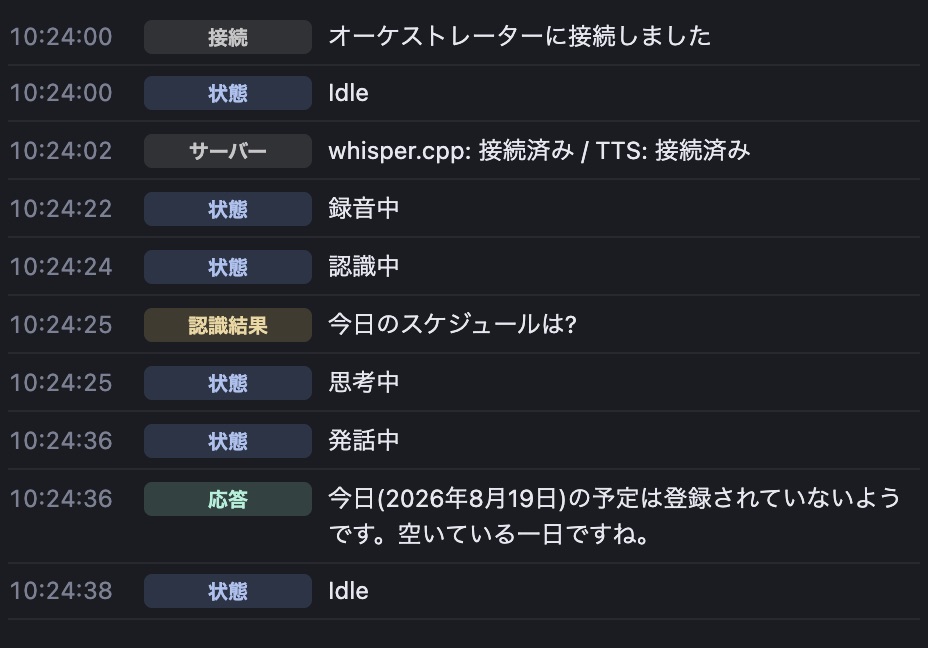
When I asked the agent to check my schedule through an MCP server, the approximate processing times were:
- Speech recognition: about 1 second
- Response generation and task execution: about 10 seconds
- Speech synthesis: about 1 second
Actual times vary depending on the environment and the request.
Current Limitations
Section titled “Current Limitations”- Speech recognition can fail because of the way I articulate certain words
- Once a misrecognized request has been sent to the AI agent, I cannot interrupt the operation midway
- The agent can sometimes infer the intended request despite transcription errors, but interruption and cancellation are still necessary to prevent unintended operations
What I Want to Add Next
Section titled “What I Want to Add Next”- Interrupt and cancel an interaction while the mascot is speaking
- Reduce waiting time, or fill it with brief conversation
- Change facial expressions and motions to match the response
- Train an English voice model and try using the mascot for English conversation practice
Closing Thoughts
Section titled “Closing Thoughts”This project gave me a chance not only to build a desktop mascot, but also to work through the full process of speech recognition (STT), speech synthesis (TTS), and voice-model training.
Technologies that had previously seemed like separate pieces revealed their relationships once I combined them into a single voice interaction. Recognition accuracy, generation time, and state management all shape the overall conversational experience. Preparing a dataset, training a model, and generating speech locally was especially valuable hands-on experience.
There is still plenty to improve, including response latency and interruption while the mascot is speaking. Even so, what began as a project pursued largely for fun became a practical way to learn the technologies behind voice AI.
I plan to keep refining it into a desktop mascot that can hold a more natural conversation.